Rough thoughts in. Publishable posts out.
Drafty takes whatever you have — a messy paragraph, a bullet dump, a voice-note transcript — and shapes it into a LinkedIn post or X thread that still sounds like you. Paste, polish, publish.
Drafty / voice note → LinkedIn post
What you paste in
- - shipped v2 after 6 months
- - almost gave up in march
- - lesson: small launches compound??
- - something about thanking early users
What you publish
Six months ago I started building v2. In March, I almost gave up.
Yesterday it shipped. The lesson I keep coming back to: small launches compound.
Why Drafty
Voice-preserving edits
Drafty restructures your draft for clarity and rhythm without sanding off your tone. The post that comes out reads like you on a good day — not like a template.
LinkedIn and X native
Get a LinkedIn-ready post and a properly paced X thread from the same draft, with hooks, line breaks, and emphasis that survive copy and paste.
Zero setup
No account, no onboarding flow, no blank-page anxiety. Paste your rough notes and get a publishable draft back in seconds.
Publish the draft you keep postponing.
Your next post is already written — it is just rough. Drop it into Drafty and ship it today, no signup required.
Open DraftyDrafty, wherever you write.
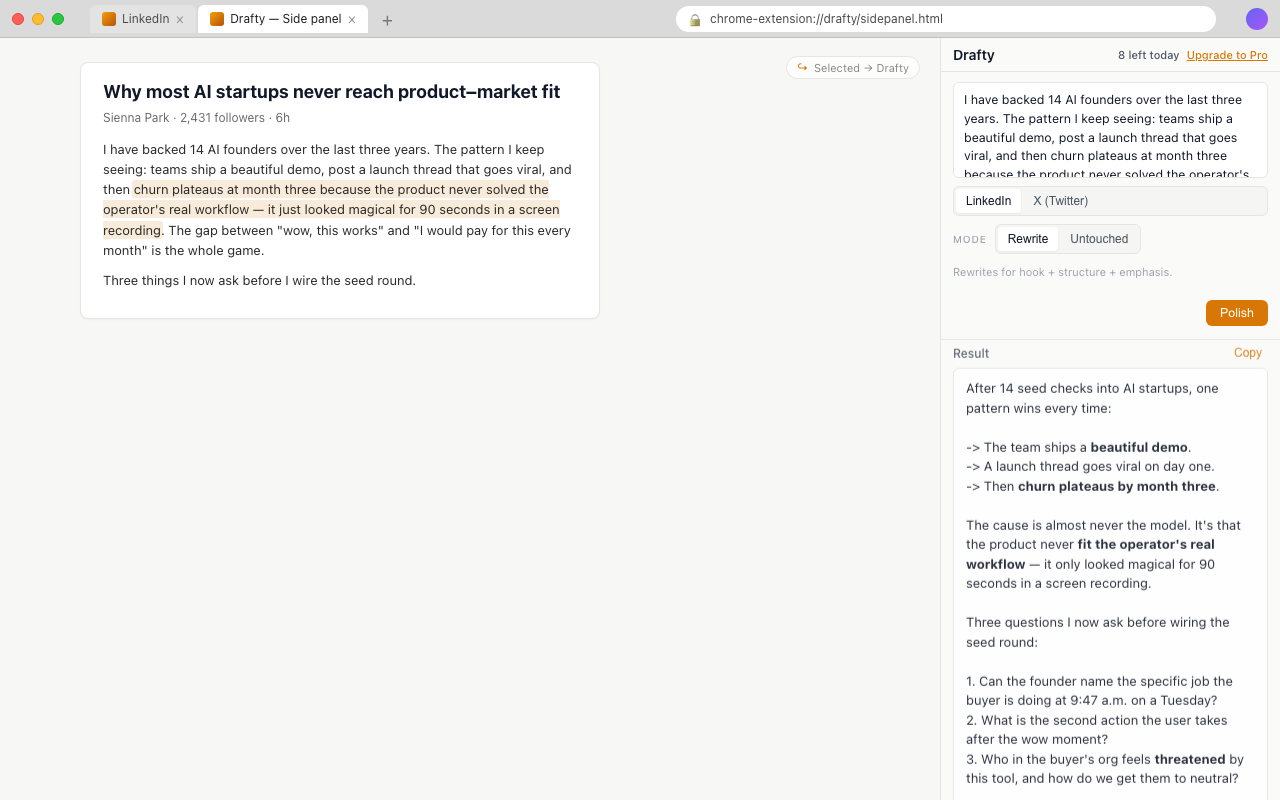
Drafty for Chrome brings the same voice-preserving polish into a side panel on any page. Select text, right-click, and refine — no new tab, no context switch.
Polish without leaving the page
Select any text on the web — a draft in a LinkedIn composer, a paragraph from a doc, a voice-note transcript — right-click, and Drafty opens in a side panel with your text ready to refine.
Same Drafty, in a side panel
The extension reuses your drafty.ink session and billing. No separate login, no second account. Whatever you can do on the site, you can do from the panel.
Three input paths
Paste into the panel directly, select text in any input field (like the LinkedIn post box) and right-click, or select text on the page and right-click. Everything funnels back to the panel.
Drafty · Chrome side panel